How do I delete pins from Pinterest to gain more Pinterest views without being spammy (+ when it's best to do nothing)
Wondering how do I delete pins from Pinterest to clean up your profile and boost your Pinterest views? Here’s the short answer:
Deleting pins doesn’t automatically increase your reach—and in some cases, it can actually hurt it. But there are strategic times when removing certain pins (or even full boards) can clean up your content, protect your account from Pinterest’s spam filters, and improve your overall performance.
The key? Knowing when to hit delete and when to let your pins work for you. (Psst… I show it all step-by-step, including pro tips, on videos I’ve recorded for you in this blog.)
Now, if you’ve ever found yourself staring at your Pinterest boards, debating whether to purge old or underperforming pins, you’re not alone.
Maybe you feel like your profile is a hot mess of outdated content, or you worry that Pinterest is punishing you for low-performing pins. Or worse—you’re afraid you’ve been posting too much and looking spammy.
And then there’s the classic misstep: deleting the wrong pins and seeing your Pinterest traffic drop overnight. 😬
So, what’s the real strategy here? When should you delete pins, and when should you leave them alone? This guide covers everything you need to know, including:
Why to delete pins from Pinterest (and when NOT to)—because deleting isn’t always the answer
How to delete a pin on Pinterest (without second-guessing yourself)
How to delete pins on Pinterest in bulk—when you’ve got hundreds or thousands to clean up
How to delete Pinterest boards strategically, without hurting your reach
How do I delete pins from Pinterest when I have thousands of pins?—and is it even worth it?
Should I delete pins from Pinterest that are old? Or do old pins actually help your reach?
How do I delete a pin from Pinterest and keep my monthly views? (Spoiler: You can’t—but there’s a workaround.)
What to do instead of deleting a pin
PLUS: The FAQs you didn’t even know you needed, like…
Help! Why won’t Pinterest let me delete a pin?
How to unpin on Pinterest when there’s no delete option
What happens when you delete a pin? Can you really erase it forever?
How do I clean up my Pinterest home feed? (Because Pinterest keeps showing me irrelevant pins!)
Can I make someone else delete my pin from their saved board?
Why does Pinterest say “gone forever” when I delete a pin?
Pinterest removed my pin—am I being punished for something I didn’t even upload?
I’ve been a business strategist for 30 years, and I’ve helped countless entrepreneurs use Pinterest to grow their audience, leads, and sales. If you want a Pinterest strategy that actually works—without spammy tactics—keep reading. Because deleting pins the right way can help you, but deleting pins the wrong way could hurt your growth or just be a complete waste of your precious time. Let’s get into it.
Full disclosure: This post may contain affiliate links that, at no additional cost to you, I may earn a small commission from.

Don’t forget to pin this image!
Why to delete pins from Pinterest (and when not to)
Ah, the age-old Pinterest dilemma: to delete or not to delete? You've been pinning away, trying to get those dreamy leads rolling in, but now you're wondering if some of your pins are just... dead weight. Should you start fresh? Or is deleting pins a one-way ticket to tanking your reach? Let’s get into it.
First things first—deleting pins isn’t a magic reset button and can waste your time more than anything. It depends. That’s exactly what you going to uncover in this blog.
Pinterest is like a fine wine (or your favorite Netflix binge). It rewards consistency and longevity. So if you’re thinking, *“Ugh, these old pins aren’t getting traction—DELETE!”* slow your roll.
Old pins can still bring in traffic months, even years, later. That pin from 2021? It could be quietly working its magic in someone’s saved board right now.
But, my friend, there *are* times when hitting delete is the right move.
Accidentally pinned a broken link? Get rid of it.
Uploaded something outdated, cringe-worthy, or totally off-brand? Byeee.
And if you pinned something that’s performing so badly it’s embarrassing (think: zero clicks, zero saves, zero hope), sometimes it’s better to cut your losses and move on.
What about duplicate pins? Here’s the tea: Pinterest isn’t a fan of spammy, copy-paste content.
If you’ve been repeating the same pin over and over thinking *more is more*, Pinterest might be side-eyeing you in the algorithm. In that case, trimming down duplicates and focusing on fresh, high-quality content is the smarter play.
*Pssst...* pro tip coming:
Avoid getting flagged as spam for deleting too much or wasting your time
Before you start deleting pins left and right, know this—Pinterest doesn’t love it when users delete a lot of pins in a short time. If you’re constantly removing pins, your account could be flagged as spammy, or worse, suspended. Instead of mass deleting, focus on strategic pruning.
That said, there *are* cases where large-scale deletion is necessary, like rebranding or fixing major content issues.
If you need to do a major clean-up, keep on reading for a methodical approach to removing large numbers of pins without harming your account. I’ve covered it all for you in this blog.

How to delete a pin on Pinterest
If you’re wondering “how do I delete a pin from Pinterest?”, the process is simple, whether you’re using the Pinterest app or a desktop. Below, we’ll walk you through how to delete a pin on Pinterest step-by-step.
How to delete a pin on Pinterest on the app
Want to know how to delete a pin on Pinterest on my iPhone or any mobile device? Here’s what to do:
1. Open the Pinterest app and go to your profile.
2. Locate the pin you want to delete (or unpin if it’s a saved pin from someone else).
3. Tap the three-dot menu (top-right corner of the pin).
4. Select ‘Edit Pin’ and scroll down.
5. Tap ‘Delete Pin’, confirm your choice, and—poof!—it’s gone forever.
Watch the step-by-step video I’ve recorded for you to show you exactly how.
If you want to delete multiple pins at once, follow these steps:
1. Open the Pinterest app and go to your profile.
2. Click on the board where you want to delete pins.
3. At the bottom of the screen, tap ‘Organize’.
4. Select the pins you want to delete or tap ‘Select All’ for bulk selection.
5. Tap the bin/trash icon, confirm, and delete!
Want to see the video of how to do this? Keep on reading, I’ve included one in the section about how to delete pins on Pinterest in bulk.
How to delete a pin on Pinterest on your desktop
If you prefer managing your Pinterest account on a desktop, here’s how to delete a pin on Pinterest from your computer:
1. Log into Pinterest and navigate to your profile.
2. Find the pin you want to delete.
3. Click the pencil icon on the bottom corner of the pin.
4. Choose ‘Delete’ button.
5. Confirm, and just like that, the pin is gone.
If you’re wondering “how to remove a pin from a Pinterest board” without deleting it entirely, you can move it to another board.
And there you have it! Whether you want to delete pins on Pinterest, or just delete a pin from Pinterest, now you know exactly what to do, my friend.
How to delete pins on Pinterest in bulk
Got a ton of pins you need to erase? Maybe you rebranded, or your old strategy wasn’t cutting it. Either way, deleting pins one by one sounds about as fun as watching paint dry.
Good news: Pinterest lets you delete pins in bulk.
How to delete pins on the app in bulk
If you need to bulk delete pins using the Pinterest app, follow these steps:
1. Open the Pinterest app and go to your profile.
2. Click on the board where you want to delete multiple pins.
3. Tap ‘Organize’ at the bottom of the screen.
4. Select the pins you want to delete or choose ‘Select All’.
5. Tap the bin/trash icon, confirm, and delete them all at once.
How to delete pins on a desktop in bulk
1. Go to your Pinterest profile and open the board where your pins are living rent-free.
2. Click ‘Organize’ (you’ll see checkboxes pop up on the pins).
3. Select all the pins you want to delete.
4. Click the trash can icon and confirm the deletion.
That’s it—batch deletion, done and dusted.
Want to see exactly how it’s done? Here is my short video tutorial on how to delete pins in bulk on Pinterest.
How to delete Pinterest boards
Ahhh, the Pinterest board purge. Time to move from how to remove a pin from a Pinterest board to how to delete Pinterest boards!
Maybe you’ve got a Pinterest board full of outdated ideas, a chaotic mess of pins that make zero sense for your business anymore, or let’s be real—a “Vision Board 2020” that hasn’t aged well. Time to clean house.
But before you go on a deleting spree, let’s talk strategy.
When does it make sense to delete a Pinterest board?
So as you ask yourself how to delete Pinterest boards, note that deleting a Pinterest board is permanent. If that board has pins still driving Pinterest traffic to your website, nuking it could hurt your Pinterest reach and monthly views.
So before you delete a Pinterest board, ask yourself:
Is this board completely off-brand for my business now?
Do I never pin to it anymore?
Are the pins outdated and no longer useful?
Does it have low engagement and zero traffic coming from it?
If the answer is yes to all—then it’s your call. If not? Keep reading, pro strategy coming right away.
The smart way to delete Pinterest boards in full control
Instead of deleting everything outright, use Pinterest’s “Organize” feature to move your best-performing pins somewhere else first. Here’s how:
Open the board you want to delete.
Tap “Organize” (on mobile) or click the checkmarks next to pins.
Select “Move” and choose another board to save them.
Once your best pins are safe, delete the board.
Boom—cleaned up your profile without trashing good content.
Feeling a touch nervous about moving pins around? Nothing like watching on my video exactly how you can do it in a breeze.
How to delete Pinterest boards in a few clicks
Alright, if you’re sure you want to delete, here’s how:
Open Pinterest and go to your profile.
Click the “Saved” menu to see your Pinterest boards.
Once you’ve found the board, tap the Pencil icon in the bottom right corner to edit your board.
Scroll down and hit “Delete board.”
Pinterest will warn you that this can’t be undone—so double-check before you confirm.
At the time of writing, Pinterest gives 7 days to recover a Pinterest board once deleted (on the desktop, not the app).
And just like that—it's gone.
The Pinterest Cleanup That Changed Everything
Jess, one of my clients, swore her Pinterest wasn’t working for her business. Traffic was meh. Sales? Even worse.
When I looked at her boards, she had dozens of random, unrelated boards (including one for wedding cakes—she was a website designer, btw).
The fix? We deleted what wasn’t serving her, moved her best content to strategic boards, and cleaned up her profile.
A few weeks later, her Pinterest views shot up by 257%. And now? She’s sending me screenshots of her inbox full of new client inquiries with the message: “Pinterest is my best lead source now—WHO KNEW?!”
So yeah, deleting Pinterest boards (the right way) can be a total game-changer. Ready to clean up yours?
Alternatively, optimise your Pinterest boards, starting with your Pinterest board names. Time to ditch those Pinterest board names that never pop up on search.
Ddiscoveer all my Pinterest board names secrets in this blog: The only Pinterest board names you need to explode your Pinterest views for online leads

How do I delete pins from Pinterest when I have thousands of pins?
If your Pinterest account is overflowing with thousands and thousands of pins, manually deleting them one by one isn’t just soul-crushing—it’s a total waste of time.
But don’t worry, there are ways to clean up your account without spending weeks clicking delete.
1. Use the bulk delete feature (fastest manual option)
Pinterest lets you delete multiple pins at once inside a board, which is a lifesaver if you need to do a mass cleanup.
Open the Pinterest app or log into Pinterest on your computer.
Navigate to the board where the pins you want to remove are stored.
Tap ‘Organize’ at the bottom (on the app) or click ‘Organize’ (on desktop).
Select multiple pins manually or tap ‘Select All’ to grab everything at once.
Tap the trash/bin icon, confirm, and—boom—those pins are gone.
This method is great for tidying up individual boards but isn’t ideal if you need to delete pins on Pinterest across multiple boards at once.
Best of all, get your Pinterest working for you and ditch all the hours of second-guessing what is affecting your performance. Discover exactly how by joining my Pinterest signature course: The Profitable Pinterest Secrets, because there is a simpler way to gain more traffic, leads and time freedom.

2. Ask Pinterest support for help deleting pins in bulk
If you’re thinking, “How do I delete pins from Pinterest when I have THOUSANDS?” and the bulk delete tool just isn’t cutting it, you might be able to get Pinterest Support to help.
While Pinterest doesn’t openly advertise mass deletion services, some users have successfully requested large-scale pin removals when they needed a major cleanup. Here’s how to ask:
Go to Pinterest’s Help Center.
Select ‘Account Settings’ → ‘Report a Problem’.
Explain your situation—for example, you’re rebranding, removing outdated content, or changing your website URL.
Politely request a bulk pin removal and provide details (e.g., specific boards or a timeframe).
Pinterest may help if your request is reasonable, but they won’t delete random pins just because you changed your mind about them.
3. Consider archiving instead of deleting
If you want to declutter your profile but aren’t sure about deleting, archiving boards might be a better option. This keeps them hidden from your profile and prevents new saves but allows you to restore them later if needed.
So if you’re tempted to go big to delete pins because they don’t fit your brand anymore, pause. Instead of deleting, try archiving Pinterest boards. This:
Hides the Pinterest board from your public profile.
Prevents new saves, so the content stops circulating.
Lets you keep old pins in case you change your mind later.
To archive, just go to the board, tap ‘Edit’, and select ‘Archive’. No mass deletion required.
4. Use a Pinterest-approved tool for large-scale deletions
If you need to delete a massive number of pins across different boards, some Pinterest-approved scheduling tools (like Tailwind) have bulk deletion options. These can:
Filtering pins by date, engagement, or keywords before deleting. Sort pins by engagement (so you don’t accidentally delete high-performing ones).
Bulk selecting across multiple boards at once. Delete pins from multiple boards at once (way faster than Pinterest’s built-in tool).
Schedule deletions over time to avoid getting flagged as spammy. Automating large-scale deletions in a controlled way helps minimize the risk of your Pinterest account being flagged as spammy behavior. The risk always exists, though.
5. Avoid Getting Flagged for Deleting Too Much
Real talk: Pinterest doesn’t love it when you go on a delete spree. If you suddenly wipe out hundreds of pins, your account might get flagged as spammy—or worse, suspended.
Instead of nuking everything overnight, try deleting in waves over a few weeks. This keeps your account looking natural and prevents sudden drops in engagement.
Pro tip:
And remember: deleting pins won’t magically boost your reach.
Focus on creating fresh, strategic content instead of spending all your time deleting the past.
If you’re dealing with a major rebrand or need a total reset, consider approaching Pinterest customer support for the best approach to cleaning up your Pinterest account without harming your Pinterest SEO.
Want to learn more about the exact strategies that work on Pinterest today. Don’t miss my other blogs:
A Beginner’s Guide To Pinterest Board Ideas To Get Pinterest Working For You
What Is Pinterest About? All You Need To Know About Pinterest In Marketing Today
Pinterest Affiliate Marketing: The Ultimate Guide | Affiliate Marketing For Beginners
What Are Impressions On Pinterest? What Every Online Entrepreneur Can’t Ignore Today, But Many Miss
How To Make Money On Pinterest - 12 Ways To Make Money In Pinterest Today
127 Winning Ideas For Pinterest To Skyrocket Your Reach And Sales
The only Pinterest board names you need to explode your Pinterest views for online leads
The Ideal Pinterest Cover Photo Size To Boost Your Email List In 2024 + Free Canva Profile Templates

Should I delete pins from Pinterest that are old?
Ah, the age-old question (pun fully intended). You’re scrolling through your Pinterest boards, spotting pins from way back when, and thinking, “These are ancient… should I just delete them?”
Before you start mass-deleting, let’s get one thing straight: old DOESN’T mean useless.
Unlike Instagram posts that fade into oblivion after just a few days, Pinterest is a long-game platform.
That pin you posted two years ago? It could still be bringing in clicks, repins, and traffic today.
Sounds like an unlikely statement? Think again. I keep on having pins popping up 1-2 years after I pinned them going viral. I couldn't believe my eyes the first time!
Pinterest thrives on evergreen content, which means even older pins can pop up in searches and drive leads years later.
When you shouldn’t delete old pins
They’re still getting engagement – Check your Pinterest analytics before you delete anything. If a pin is still getting clicks, saves, or impressions, let it be. Deleting it is like throwing away a winning lottery ticket.
They link to valuable content – Even if an old pin isn’t performing right now, it could still be discovered later. As long as it links to a blog post, freebie, or product that’s still relevant, it has potential.
They align with your brand – If the pin’s design and messaging still fit your brand, there’s no harm in keeping it. Updating the image and repinning a fresh version might be a better move than deleting.
It takes you too much time to delete pins and you’re better off creating and pinning fresh content.

When you should consider deleting pins
They link to broken pages – If the URL is dead, the product no longer exists, or the blog post was deleted, it’s better to remove the pin or update the link.
They’re completely off-brand – If you’ve rebranded and an old pin is way out of alignment with your new look, audience, or messaging, consider deleting it (or at least making it private).
They have zero engagement – If a pin has been sitting on your account for years with zero clicks, saves, or impressions, it might be dragging your profile down.
And, my friend, go beyond thinking “delete or not delete” and give a boost to your Pinterest ideas. Here is the perfect blog for you: A Beginner’s Guide To Pinterest Board Ideas To Get Pinterest Working For You.

The smarter alternative: refreshing instead of deleting
Instead of removing old pins, try this: repurpose and refresh.
Update the pin image – If the content is still relevant but the design feels outdated, create a fresh, high-quality pin with a modern look. You won't be able to change the graphic on an existing pin. So this is about pinning fresh content.
Optimize the pin description – Add better keywords and a more engaging description to improve visibility. You can do this by editing an existing pin.
Repin to relevant boards – Sometimes, giving an old pin a new home (a well-optimized board) is all it takes to revive it.
It isn’t always about how to delete a pin on Pinterest. Here is how to edit a pin instead
If something needs to be fixed—like a broken link, outdated description, or missing details—you don’t have to delete the pin. You can edit it instead:
On Desktop:
Open Pinterest and go to your profile.
Find the pin you want to update and click on it.
Click the pencil/edit icon in the top-right corner.
Update the link, title, description, or board as needed.
Click Save, and you’re done!
On the Pinterest app:
Open the Pinterest app and go to your profile.
Tap the pin you want to edit.
Tap the three dots (…) and select ‘Edit Pin’.
Update the URL, description, or board.
Tap Save to keep your changes.
This way, instead of deleting a pin that just needs a small tweak, you can fix it and keep the engagement it’s already built.
Don’t miss my video tutorial below to see how straight forward it’s to edit a pin.
Bottom line: think before you delete a pin on Pinterest
Deleting pins from Pinterest isn’t an automatic growth hack—it’s a strategic decision.
Instead of wiping out old content just because it feels outdated, take a data-driven approach. Some of your best traffic drivers might be sitting quietly in your analytics, waiting to be rediscovered.
How do I delete a pin from Pinterest and keep my monthly views?
Short answer? You can’t.
Deleting a pin on Pinterest removes all of its associated views, engagement, and traffic—there’s no way to keep those numbers once the pin is gone.
Unlike some social media platforms where deleting old posts doesn’t impact overall visibility, Pinterest treats each pin as its own entity. That means once you hit delete, it’s like the pin never existed in Pinterest’s system.
What happens when you delete a pin?
You lose all engagement – Any saves, clicks, and impressions tied to that pin are erased. If it was ranking in search results, it disappears.
It can’t be recovered – Pinterest doesn’t offer an “undo” option once a pin is deleted. If you remove it and later regret it, you’ll have to create and repin a new version from scratch.
Your monthly views might drop – If the pin was generating traffic, deleting it could lower your overall monthly views. While this doesn’t directly harm your account’s performance, it can impact your analytics.
What to do instead of deleting a pin
I know, my friend, you've been after understanding how to delete a pin from Pinterest, and now you know, you’ve understood that other options can be a better option for you.
If you’re thinking about deleting a pin because it’s outdated, broken, or off-brand, consider these alternatives first:
✅ Fix the pin – If it has a broken link or outdated description, you can edit it instead of deleting it. (Check out [this section] on how to update a pin.)
✅ Create a fresh version – If an old pin’s design isn’t working anymore, make a new version with an improved look and better keywords.
✅ Move it to a high performing Pinterest board – If your pin is sitting on a Pinterest board where you pin infrequently or is clearly not attracting monthly views, hink about moving it somewhere else. It’s like moving your shop too the high street or the mall.
✅ Make it secret instead of deleting – If you don’t want a pin to be visible but don’t want to lose the data, you can move it to a secret board instead of deleting it completely.
When Should You Delete a Pin?
While deleting pins isn’t ideal, there are times when it makes sense:
❌ It links to a dead page – If the URL is broken and you don’t have a way to fix it, it’s best to remove the pin.
❌ It’s completely off-brand – If a pin no longer aligns with your brand and audience (and updating it isn’t an option), deleting might be the best choice.
❌ It’s a duplicate or mistake – If you accidentally pinned the wrong image, title, or link, go ahead and remove it.
❌ It’s old and getting no views – This is affecting your SEO and removing some can be a good idea, while noot spending too much time on this type of task versus creating new, optimised pins.
Bottom Line: Delete with Caution
Since deleting a pin means losing its engagement and visibility, always think twice before hitting that trash button. If you do decide to remove a pin, be ready to replace it with fresh, high-quality content to maintain your Pinterest growth.

FAQ
Why can’t I delete my pins? Pinterest won’t give me the option to delete a pin
If you’re wondering, “Why can’t I delete a pin from Pinterest?” or “Why won’t Pinterest let me delete pins?”—don’t panic. There are a few reasons why you might not see the option to delete a pin on Pinterest:
1️⃣ It’s not your pin – If you saved a pin from someone else’s account, you don’t own it, so you can’t fully delete it. However, you can remove it from your board by using the unpin option. (See below for how to unpin on Pinterest.)
2️⃣ You’re on the home feed – Pinterest doesn’t let you delete pins directly from your home feed. To delete a pin, go to your profile, open the board where the pin is saved, and delete it from there. Check out later on how to fine-tune your Pinterest home feed.
3️⃣ Pinterest glitch – Occasionally, Pinterest has glitches where the delete option doesn’t appear. If this happens:
Log out and back in.
Try deleting the pin from a different device (app vs. desktop).
Clear your browser cache or update your Pinterest app.
4️⃣ You’re using the wrong method – Deleting a pin varies slightly depending on whether you’re using the Pinterest app or desktop. Make sure you’re following the correct steps:
On mobile: Go to the pin → Tap the three-dot menu → Edit Pin → Scroll Down → Delete Pin
On desktop: Click on the pin → Tap the three-dot menu → Edit Pin → Delete
Pro tip:
Be mindful to follow these steps in the order shown. If you click on the three-dot menu BEFORE you’ve clicked on the pin, you won’t see the Delete option.
5️⃣ Account restrictions – If you recently made too many deletions at once, Pinterest might temporarily limit your ability to delete more pins. If you suspect this, wait a few hours and try again.
Don’t forget that great Pinterest performance starts with an optimised Pinterest account set-up. So here is my treat for you (free for you): 7 Essential Steps to Kickstart Your Pinterest for Traffic on Autopilot.

How to unpin on Pinterest if you can’t delete a pin
If you can’t delete a pin because it’s not yours, but you don’t want it on your board any more, you can unpin it instead.
How to remove a pin from a Pinterest board that isn’t yours:
Open Pinterest and go to your profile.
Find the board where the pin is saved.
Tap the pin
Click on the three-dot menu.
Choose ‘Delete’ (on desktop) or ‘Delete this Pin’ (on mobile).
This will take the pin off your board even if it isn’t yours. The original pin continues to exist, but doesn’t show any longer in your account.
How do I permanently delete a pin I created on Pinterest after deleting it?
Even if you delete a pin from your Pinterest account, any copies that others have saved will still exist.
When someone saves your pin, Pinterest creates a duplicate on their board, meaning you can’t fully erase it from the platform.
Some of the times when Pinterest deletes a pin across all accounts is when it violates community guidelines, or copyright rules.
For example, if a brand reports an image for unauthorized use, Pinterest may remove every instance of that pin—even from boards where it was saved. I had this happening to me before and I can say that Pinterest was so responsive to protecting my copyright!
Here is the screenshot of the action Pinterest took within the same day I reported it to protect my coopyrights:
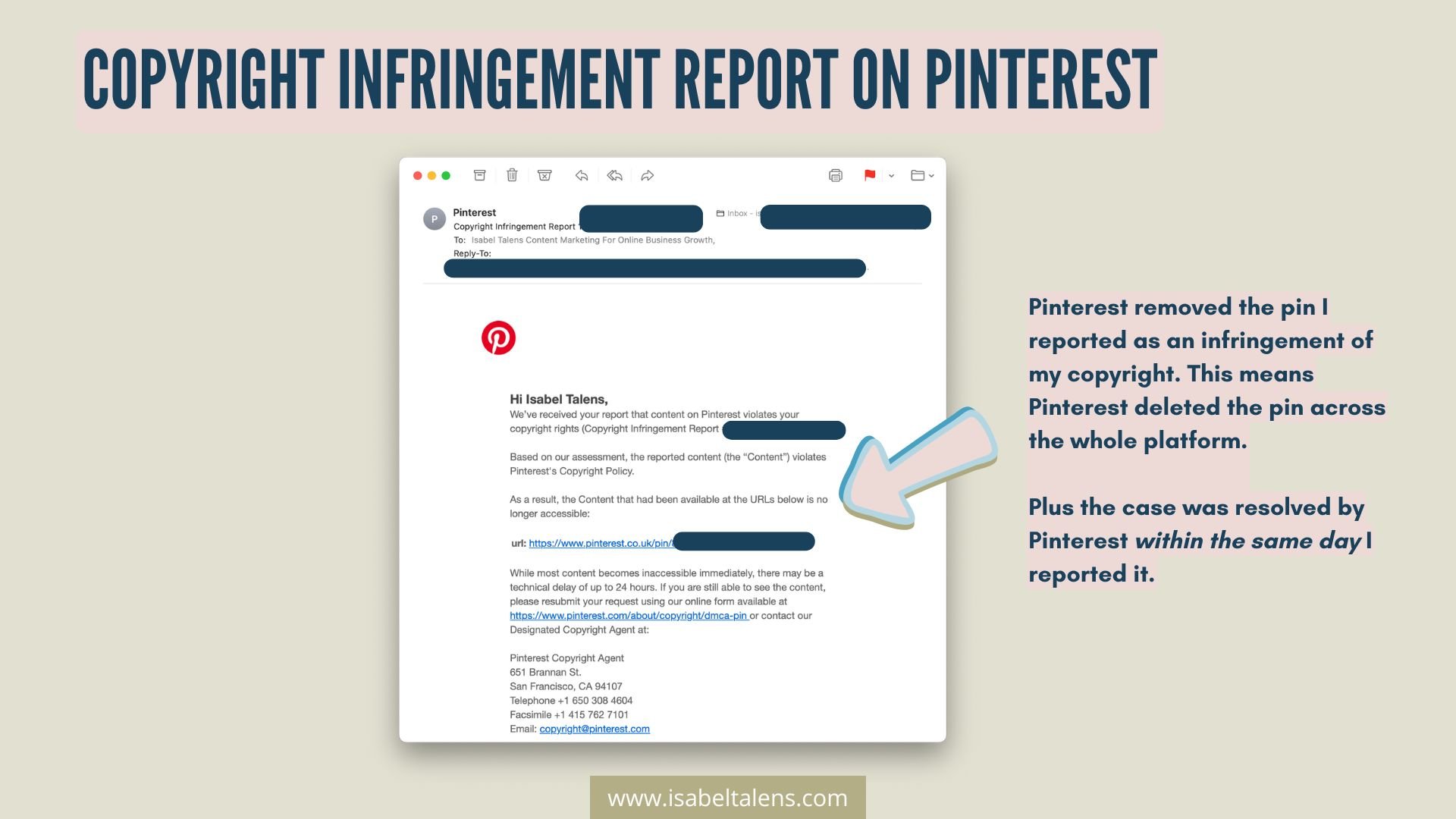
If you need a pin taken down across Pinterest, you can try filing a copyright or content violation report through Pinterest’s Help Center.
Outside cases like these, in most cases, once a pin has been saved by others, it’s out of your hands.
How to remove saved pictures? How to unpin on Pinterest a repin?
So, you saved a pin, and now you’re having second thoughts. Maybe it doesn’t fit your aesthetic, maybe the link is broken, or maybe—let’s be real—you were in a late-night pinning spree and got a little too enthusiastic.
Whatever the reason, here’s how to unpin on Pinterest when it’s a repin (a pin you didn’t create yourself).
Go to your Pinterest profile and open the board where the pin is saved.
Find the pin you want to remove and tap/click on it.
Look for the three-dot menu (⋮), select ‘Edit pin’, and click ‘Delete pin’
Confirm, and—poof!—it’s gone from your board.
This works whether you’re on desktop or mobile. But heads up: this only removes the pin from your board—it doesn’t delete it from Pinterest completely, because you didn’t create it in the first place.
If you’ve been saving pins that don’t align with your brand, clutter your boards, or just aren’t helping your strategy (we’ve all been there), regularly cleaning up your saved pins can keep your profile on-brand and more effective for attracting the right audience.
How do I delete pins from Pinterest home feed?
Ever opened Pinterest and thought, Why is my home feed full of stuff I don’t even like? Maybe you pinned one DIY garden project six months ago, and now Pinterest thinks you’re starting a landscaping business. Or maybe you're just over a certain aesthetic and want a fresh start. Whatever the case, let’s fix it.
Pinterest’s Home Feed is powered by your activity—what you pin, search for, follow, and engage with.
But here’s the good news: you can fine-tune what shows up with Pinterest’s built-in settings. Here’s how to delete pins from Pinterest home feed (or at least stop seeing ones that don’t serve you).
1. Adjust your home feed preferences in profile settings
Tap your profile picture in the Pinterest app (or click it on desktop).
Go to Settings > Home Feed Preferences.
Here, you’ll see sections that influence your feed:
Pins (what you’ve engaged with)
Interests (topics Pinterest thinks you like)
Boards (what your saved pins are grouped into)
Following (accounts you follow)
2. Fine-tune your pins
Want to stop seeing pins similar to something you regret clicking on?
In Home Feed Preferences, go to Pins and look for the ones that keep showing up.
Click Remove to stop Pinterest from using that pin as inspiration for future recommendations.

3. Edit your interests (a.k.a. What Pinterest thinks you like)
Pinterest automatically assigns interests based on your activity. If it got something wrong (No, Pinterest, I do NOT need more 'cabbage recipes'), you can fix it:
In Home Feed Preferences, go to Interests.
Uncheck topics that don’t align with what you want to see.
4. Manage your boards
Pinterest assumes you want more of what’s inside your boards (which is great—unless your old pins don’t reflect your current focus).
In Home Feed Preferences, go to Boards and deselect any boards you don’t want influencing your recommendations.
5. Unfollow or mute accounts you don’t want in your feed
Following a bunch of accounts can flood your feed with their content—even if it's not what you want anymore. Here’s how to delete a pin from Pinterest home feed by managing who you follow:
Go to Home Feed Preferences > Following.
Unfollow or mute accounts that no longer match your interests.
This method isn’t about deleting pins from Pinterest entirely but resetting what Pinterest recommends, so your home feed is filled with content that actually aligns with your brand, strategy, or personal taste.
Can I make someone else delete my pin from their saved board?
Short answer? No. Once someone saves your pin to their board, Pinterest creates a separate copy of it—which means you don’t have control over whether they delete it.
This can feel frustrating, especially if you’ve rebranded, updated your offers, or just don’t want an old pin circulating anymore. But Pinterest’s system works like this to keep content discoverable.
So, what can you do?
While you can’t force someone to delete your pin, there are a few cases where Pinterest automatically removes saved copies across all accounts:
If you delete a pin for copyright or policy violations
If your pin was taken down for copyright infringement, trademark violations, or policy breaches, Pinterest often removes all instances of that pin across saved boards.
Example: If a stock photo provider reports your image for improper use, Pinterest deletes every copy—not just the original.
If Pinterest deactivates or removes your account
If your account is suspended, deactivated, or removed, many of your original pins may disappear from Pinterest entirely (but not always).
If the pin links to a broken or banned website
Pinterest sometimes removes all versions of a pin if the linked website gets flagged as spam or goes against their community guidelines.
What If You Really Need a Pin Removed?
If a pin is outdated or causing issues (maybe it promotes an old product or contains incorrect information), you have a few options:
✔️ Kindly ask the user to remove it – If you can find them, a polite message explaining why you’d appreciate them deleting the pin might work. (No guarantees, though.)
✔️ Report it to Pinterest – If the pin is misleading, stolen, or violating policies, you can report it. If Pinterest agrees, they might remove all instances.
✔️ Create an updated version – Instead of stressing about an old pin, focus on creating a new, optimized version and strategically pushing that out instead.
At the end of the day, you control what you create—not what others save. The best strategy? Keep putting out great, up-to-date content that makes the old stuff irrelevant.
Please spruce up your Pinterest profile to capture attention right when people find your account on Pinterest. You’ve been warned: another freebie for you coming!

When I delete a pin from my board, it says it will be “gone forever”
Yep, Pinterest isn’t kidding when it says that. When you delete a pin from your board, it’s permanently removed from your account—you won’t be able to restore it later.
But here’s the catch: This only applies to your saved version of the pin. If others have already saved it, their copies will still exist on Pinterest.
Want a less permanent option? Try making a board secret instead.
If you’re unsure about completely deleting a pin but don’t want it to be publicly visible, you can move it to a secret board instead.
Here is how to do your Pinterest board secret:
Create a new board (or use an existing one).
Toggle "Keep this board secret" in the settings.
Move the pin to that board instead of deleting it.
This way, the pin stays in your account but is only visible to you. Perfect if you’re rebranding, archiving old content, or just need time to decide.
“We removed your pin” – am I being punished for something I didn’t upload?
Getting that dreaded “We Removed Your Pin” message from Pinterest can feel like a punch in the gut—especially when it wasn’t even your upload.
But here’s the deal: Pinterest enforces content guidelines across the entire platform, not just based on who originally uploaded the pin.
‘Why did Pinterest remove a pin I saved?’, you may ask my friend.
Even if you didn’t create the pin, Pinterest may remove it from your board if:
It violated Pinterest’s guidelines (e.g., spam, misleading claims, copyright issues).
The original creator asked for it to be deleted it or their account was suspended.
A copyright holder filed a takedown request, and Pinterest had to remove it across all accounts.
Could this affect your account?
This means you’re not necessarily being punished—but if you keep saving content from questionable sources, Pinterest might flag your account as engaging with low-quality or risky content.
Usually, you won’t be penalized for unknowingly saving a pin that later gets removed. But if multiple pins from your boards get flagged, Pinterest might:
Reduce your reach in the algorithm.
Mark your account as spammy if you repeatedly save or interact with guideline-violating content.
What can you do?
Check the source before saving a pin. Does the link work? Is it from a legit website?
Review your saved pins now and then to remove anything that might not align with Pinterest’s best practices.
If you believe it was a mistake, you can reach out to Pinterest Support and ask for clarification.
The reality is that all this can be extremely time-consuming. So don’t ponder too long on all these things unless you see a sudden drop in your traffic on Pinterest that you feel is unexplained.
Bottom line? You can’t always control what happens to pins you save, but you can be mindful of what you pin to protect your account.

How Do I Delete a Section of a Board Without Losing the Pins?
So, you created different Sections inside your Pinterest board—maybe to keep things organized—but now you’ve changed your mind. You want to delete a section, but you don’t want to lose all the pins inside it.
Here’s the good news: You can delete a section without deleting the pins. They won’t disappear; instead, they’ll be moved directly into the board itself.
How to delete a section without losing pins:
Go to the Pinterest board where the section is located.
Click on the section you want to delete.
Tap the three dots (•••) in the top-right corner.
Select “Delete section.”
Pinterest will ask you to confirm. It will also tell you that the pins will be moved to the main board, not deleted.
Confirm, and the section will be removed—but all the pins will remain!
What if you want to move pins to a different board first?
If you don’t want all the pins mixed into the main board, you can move them to a different board before deleting the section:
Open the section.
Tap “Select” (on mobile) or hover over each pin and click the checkmark.
Choose “Move” and pick the board where you want the pins to go.
Once all the pins are moved, delete the section as described above.
Why does Pinterest have sections if you can’t delete them separately?
Pinterest sections were designed to help organize your boards—not to function as standalone collections. Unlike full boards, sections can’t exist independently, so when you delete a section, its pins stay with the board.
Now you know exactly how to reorganize without losing any of your valuable saved pins!
Don’t leave this blog without watching my FREE Pinterest training:

What next?
Wow, that was quite a lot for what feels like a dry subject, how to delete pin on Pinterest!
Let’s ot leave it here, my friend, and go beyond to get your email list and online leads growing with Pinterest:
It is a real privilege to know that you read and find value in my blog!
A BIG thank you for being here with me until the end.
Don’t forget to save this pin:







Hi! I’m Isabel

Visual content creation is my passion
The sea is my happy place!
For years and years I have created and produced content, in particular visual content. You can find me very often with my cameras and tripod out and about!
My passion is to help solopreneurs and small business owners like you grow your online audience and biz using Pinterest. Yes, I’ll show you hacks and tools, but I believe that you need more than that to be successful. That’s why I combined my Pinterest expertise with powerful content marketing, business and mindset strategies to get your online presence to the next level! 🥳
Ah, I have also worked for 24+ in the corporate world, leading quite a mix: transformation, marketing, coaching, sales, productivity, programme management, investments and product management.
I love sharing all these skills with you in my blog.
I am also founder of Agavea Properties, our family holiday rental business. My husband and I lead it with the passion with one goal in mind: serving our customers to create a memorable holiday experience for them.
So there you have it, that’s me! Ah... I almost forgot, my happy place is by the sea.
Thanks for being here with me!

You’ve got one goal right now: Make your first $1,000 online. Not a six-figure empire. Not a viral Reel. Just your first proof-it’s-possible paycheck from something you built.
And if you’re being honest… you thought you’d be there by now. Because you have been trying.
You’ve downloaded more freebies than you can count—most of them still sitting unopened in your inbox.
You’ve watched the webinars.
You’ve spent hours tweaking your freebie, trying to figure out if you need a niche or a “value ladder” or a funnel that doesn’t look like a bowl of spaghetti.
Meanwhile, the sales? Nada.
Your to-do list is full but your bank account’s not.
And that voice in your head keeps whispering: “What am I doing wrong?”
I see you. Because I was you.
And here’s the truth that changed everything for me: trying to follow 6-figure advice at $0 is like skipping Season 1 of your favorite show and expecting Season 5 to make sense.
You’re watching characters you don’t know, chasing plot twists that don’t land, and wondering why everyone else seems obsessed—while you’re just confused and low-key exhausted.
That advice you’re seeing all over your feed? It’s not bad. It’s just not made for this season of your journey.
Your Season 1 is about clarity, confidence, and cash flow—not scale, teams, or evergreen launches.
And that’s why I’m sharing this: these are the 9 lessons that actually helped me make my first $1K online.
Not the shiny version, not the 6-figure hindsight advice—but what really worked when I was in the trenches figuring it out, one messy step at a time.
Let’s break it down.
Key Takeaways (what you’ll learn):
Do you need a website to make your first $1,000 online? → No, but you do need a simple homepage and a domain so people can find you and grab your freebie.
What’s the fastest way to make $1,000 online? → Start offering high-ticket affiliate products, coaching, or done-for-you services—not low-margin offers like dropshipping or $2 affiliate links.
What type of content leads to actual sales? → Long-form content (blog, podcast, YouTube), even better when it’s searchable + Pinterest for traffic. Way better than social posts that disappear from your audience’s feed in 24 hours.
Do you need a complicated funnel to start selling? → Not at all. Use this simple path: Content → Freebie → Welcome Email → Personal Offer.
Can you sell a course before it’s built? → Yes. Pre-sell the idea, build as you go or deliver live. You’ll get paid before you create the lessons.
How do you grow without burning out? → Ditch perfection. Use just-in-time learning, take messy action, and stop trying to “know everything” before you start.
Tempted to just skim the takeaways and dip? I get it. You’ve read a million “how to make your first $1,000 online” posts. But this one? It’s different. Because it doesn’t just give you strategies—it walks you through the real-life missteps, detours, and unpopular truths that actually got me there.
Like the photo membership I never launched.
The blog that brought sales while I slept.
The $1000 I made before even building my course.
If you’re the kind of person who learns best from honest behind-the-scenes over polished highlight reels—you’re in the right place.