The ideal Pinterest cover photo size to boost your email list in 2024 + free Canva profile templates
There is more to the Pinterest cover photo size than the actual pixel size. It’s time to stop thinking of your Pinterest cover photo as just a photo. The Pinterest cover photo is a premium space for your Pinterest marketing. Want to know what is the best Pinterest cover photo size right away? Here it is for you (+ before you go, don’t miss the free Canva templates in this blog—don’t say I didn’t tell you):
Best size for Pinterest cover: horizontal, 16:9 ratio, 1920 pixels wide x 1080 pixels high (or 1600 pixels wide x 900 pixels high)
Minimum size for Pinterest cover: horizontal, 450 pixels wide x 800 pixels high
Discover here how to leverage your Pinterest profile photo to grow your Pinterest account, your Pinterest followers and, even more importantly, your email list here starting with how to create an irresistible Pinterest profile! (Yup, you heard that right)
In this blog I share my experience on Pinterest over the years. I’ll give you the perfect size, the 5 elements it should have, free Canva templates for an irresistible Pinterest cover photo and more.
Here is what you’ll find:
Why your Pinterest cover photo matters for Pinterest results
How do I add a cover photo in Pinterest? (with a step-by-step video tutorial)
How to change Pinterest cover photo on phone? (with a step-by-step video tutorial)
9 done-for-you FREE Canva templates for your Pinterest photo covers
Bonus tip: Pinterest image size guide (with a graphic you don’t want to miss)
Plus, if you want to save time, grab my 9 FREE Pinterest cover photo Canva templates, already optimized for you here. * Yeah*
Full disclosure: This post may contain affiliate links that, at no additional cost to you, I may earn a small commission from.

Don’t forget to pin this image!
What is the best size for Pinterest cover?
Let’s get this answered fast so that you can get to the bits that will create the difference.
So what size is the Pinterest cover photo 2024?
Here are Pinterest guidelines for your Pinterest cover photo size in pixels:
Best size for Pinterest cover: horizontal, 16:9 ratio, 1920 pixels wide x 1080 pixels high (or 1600 pixels wide x 900 pixels high)
Minimum size for Pinterest cover: horizontal, 450 pixels wide x 800 pixels high
See in the graphic below these sizes:

Why your Pinterest cover photo matters for your Pinterest results
Consider your Pinterest cover photo as the cover of a magazine or the main display window of your shop. Either you have an attractive and clear frontage or your ideal audience will move on and won’t stop to look at your account for more than a fraction of a second.
Based on this critical principle, here are the 3 objectives you want to achieve that I use on my Pinterest strategy:
To stop the scroll with an inspiring visual design that conveys what your Pinterest account is all about
To create brand awareness with your brand name, promise and vibe
To grow your email list with a Call To Action that offers an irresistible freebie
Now that you’re looking at your Pinterest photo cover size strategically, my friend, let’s utilize this premium space to your advantage, ensuring it’s optimized both for desktop and mobile app.
Are you already feeling you want to grow your leads with Pinterest? I’ve got you covered! Here is my FREE treat for you. Access now my free Pinterest workshop:

Your Pinterest cover photo ideas: 5 must-have elements
To extract maximum value from your premium space on the Pinterest cover photo, what you include on your Pinterer cover photo matters.
Over the years I’ve experimented with a number of variations on my Pinterest cover photo. From a collage of pins, to a striking photo to the design I use today.
So I’m sharing here with you my optimized Pinterest cover photo design so you get the best results.
To achieve the 3 strategic objectives we talked about before, this is what to include:
An inspiring photo that shows you or a niche-related inspiring image. Ensure it is well lit. It doesn’t need to be taken by a professional photographer but it needs to look professional and sharp.
Your brand name
Your brand strapline with your promise
A Call To Action (CTA) to get your freebie, including your freebie outcom
A mockup of your freebie (optional)
See these elements below in my Pinterest profile cover.
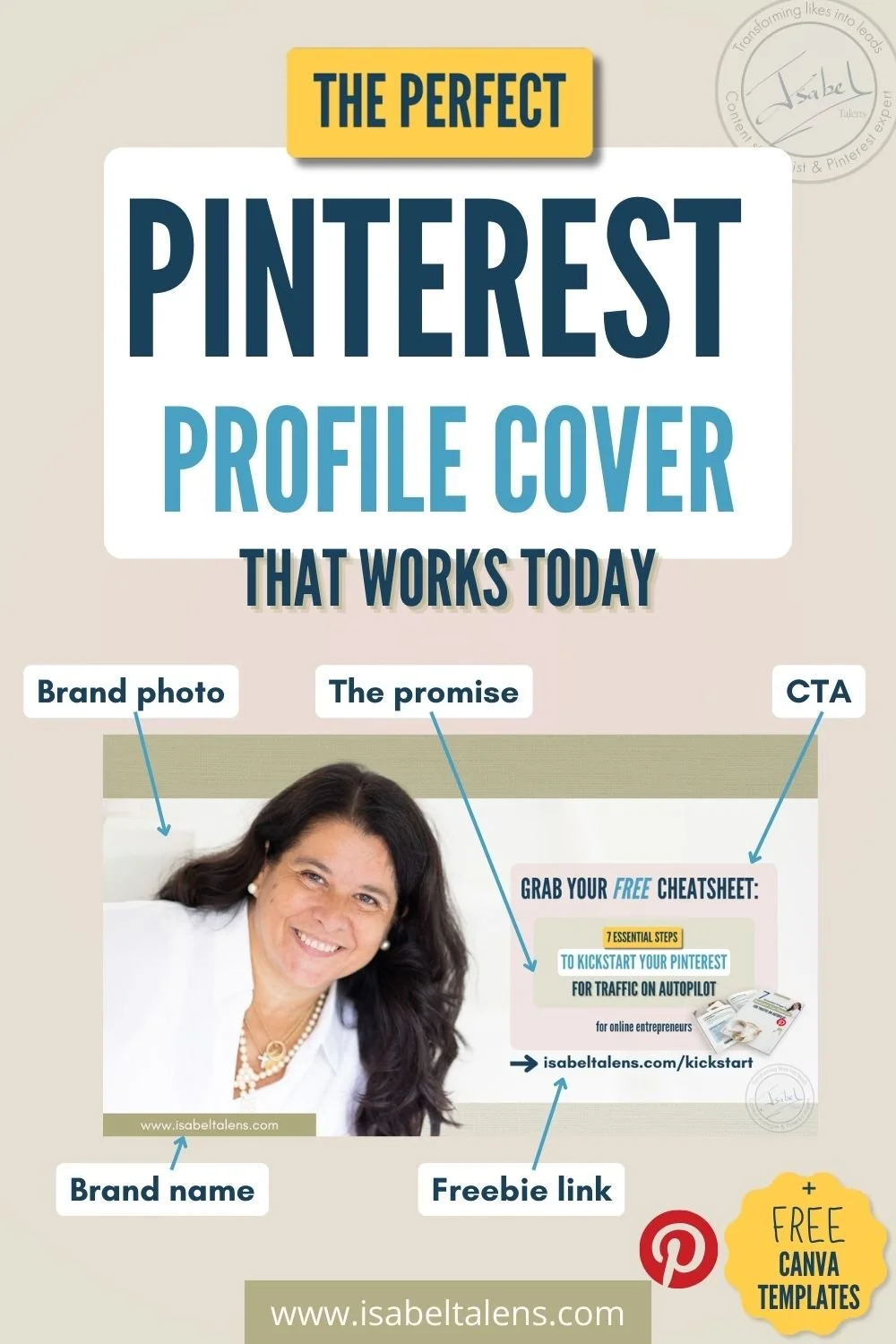
The Pinterest cover photo doesn’t have to be a headshot. You can choose to use a niche related photo (an inspiring living room decor, a fashion related photo…). You get the gist!
Still feeling quite lost with your Pinterest marketing? No worries, my friend. Grab my free Pinterest kickstart guide below to start using Pinterest for lead generation for real estate:
How to design the ideal banner for Pinterest mobile
The thing is, many refine their Pinterest cover photo for desktop and totally forget to make it mobile-friendly. You know better than that, my friend, that’s why you’ve reached this point of the blog.
In today's world where more than 50% of your audience is using Pinterest on mobile, such an oversight can be costly.
But be mindful, if you want your Pinterest cover photo to work on the Pinterest phone app as well as on desktop, there is more to it than just this ideal Pinterest photo cover size.
There are areas in the cover photo design where you should not add any important elements! Why? They’ll be obscured on the phone app by Pinterest overlay icons. What should you do?
How can you achieve a Pinterest cover photo size that also looks fab on the phone app?
There are a few areas you need to be very aware of in your design where you shouldn’t put anything. Here there are. Check out the example I have included with my Pinterest cover photo and how I have handled these areas in my Pinterest profile.
In a nutshell, never put any important information such as your brand name or CTA in these areas:
The 324 pixels high on the top (Pinterest icons get overlaid here)
Half a circle, at the bottom, in the middle, where your Pinterest profile photo goes. It start at approximately at 824 pixels from the top (see graphic below).

Sounds like a bit of a nightmare to get all this right? I’ve got you covered, my friend.
Just grab my FREE Canva templates for your Pinterest cover photo and chill. I show you in the templates exactly the no-go areas for important elements in your Pinterest cover photo.

How do I add a cover photo in Pinterest?
To add or change your Pinterest profile photo cover, you need to have a Pinterest business account. If you haven’t, just upgrade for free.
Then follow these simple steps on desktop (for Pinterest mobile, read the next section):
Click your photo profile (on the right top)
Click the Pencil icon (located on the bottom right of your profile cover)
Click Change or Remove cover
Upload your photo
Crop or pan if needed
Click Save
See the short video below to see how it is done:
And don’t stop at your Pinterest cover photo.
Don’t forget to grab my free guide, 7 Essential Steps To Kickstart Your Pinterest For Traffic On Autopilot.

How to change Pinterest cover photo on phone?
If you’re wondering how to add a banner on Pinterest mobile, here is the answer:
Click your photo profile (on the bottom right)
Once on your account page, click the 3 dots icon (top right)
Select Edit cover image
Choose a cover photo from your device
Crop or pan if needed
Click Done
Watch here the video I’ve recorded for you to see how to achieve this fast:
9 done-for-you FREE Canva templates for your Pinterest photo covers
Now, my friend, it’s time to save time to create your perfect Pinterest cover photo!
I have created 9 optimised Canva Pinterest photo cover templates that will get you achieve more than a beautiful Pinterest photo cover.
Get your 9 done-for-you FREE Canva templates for your Pinterest photo covers here. You can customize them to your brand to get the right vibe.

FAQ about Pinterest cover photo size
Are you are asking yourself any of these questions?
How do I add a cover photo in Pinterest?
What is the size of a Pinterest banner?
How to change your Pinterest cover picture in 2024?
The answer is always the same. The ideal Pinterest cover photo size is 16:9 ratio (horizontal). 1920 pixels wide by 1080 pixels tall is ideal.
Want to know further and ditch the social media burnout? Here's how to create a lead-generation engine for your biz.
Learn how to double (or triple!!) your online traffic for years - not hours
Attract high-quality leads on autopilot with my Pinterest formula.
Swipe my 4 pinning strategies that drive traffic, guaranteed
Sidestep the top 5 Pinterest mistakes that cost you time (and money!)

Bonus tip: Pinterest image size guide
Do you want to optimise more than just your Pinterest cover photo size? You absolutely should. It improves your Pinterest ranking as horizontal formats aren’t prioritized by Pinterest.
Here is the recommended Pinterest image size guide for you:
You can also choose from five different aspect ratios: 9:16, 2:3, 3:4, 4:5 and 1:1.
Ideal pin format: 2:3 aspect ratio (e.g. 1,000 pixels wide x 1,500 pixels high is just perfect)

For more experience-based Pinterest marketing strategies for online entrepreneurs to grow your online business:
A Beginner’s Guide To Pinterest Board Ideas To Get Pinterest Working For You
What Is Pinterest About? All You Need To Know About Pinterest In Marketing Today
Pinterest Affiliate Marketing: The Ultimate Guide | Affiliate Marketing For Beginners
What Are Impressions On Pinterest? What Every Online Entrepreneur Can’t Ignore Today, But Many Miss
How To Make Money On Pinterest - 12 Ways To Make Money In Pinterest Today
127 Winning Ideas For Pinterest To Skyrocket Your Reach And Sales
The only Pinterest board names you need to explode your Pinterest views for online leads

Don’t forget to save to your Pinterest!
What next?
Take action today and optimize your Pinterest cover photo size and design to grow your email list and Pinterest followers.
And don’t forget to comment and tell me:
It is a real privilege to know that you find value in my blog! Huge thank you for being here with me.
And before you go, remember to get access to my FREE Pinterest training!






Hi! I’m Isabel

Visual content creation is my passion
The sea is my happy place!
For years and years I have created and produced content, in particular visual content. You can find me very often with my cameras and tripod out and about!
My passion is to help solopreneurs and small business owners like you grow your online audience and biz using Pinterest. Yes, I’ll show you hacks and tools, but I believe that you need more than that to be successful. That’s why I combined my Pinterest expertise with powerful content marketing, business and mindset strategies to get your online presence to the next level! 🥳
Ah, I have also worked for 24+ in the corporate world, leading quite a mix: transformation, marketing, coaching, sales, productivity, programme management, investments and product management.
I love sharing all these skills with you in my blog.
I am also founder of Agavea Properties, our family holiday rental business. My husband and I lead it with the passion with one goal in mind: serving our customers to create a memorable holiday experience for them.
So there you have it, that’s me! Ah... I almost forgot, my happy place is by the sea.
Thanks for being here with me!

You’ve got one goal right now: Make your first $1,000 online. Not a six-figure empire. Not a viral Reel. Just your first proof-it’s-possible paycheck from something you built.
And if you’re being honest… you thought you’d be there by now. Because you have been trying.
You’ve downloaded more freebies than you can count—most of them still sitting unopened in your inbox.
You’ve watched the webinars.
You’ve spent hours tweaking your freebie, trying to figure out if you need a niche or a “value ladder” or a funnel that doesn’t look like a bowl of spaghetti.
Meanwhile, the sales? Nada.
Your to-do list is full but your bank account’s not.
And that voice in your head keeps whispering: “What am I doing wrong?”
I see you. Because I was you.
And here’s the truth that changed everything for me: trying to follow 6-figure advice at $0 is like skipping Season 1 of your favorite show and expecting Season 5 to make sense.
You’re watching characters you don’t know, chasing plot twists that don’t land, and wondering why everyone else seems obsessed—while you’re just confused and low-key exhausted.
That advice you’re seeing all over your feed? It’s not bad. It’s just not made for this season of your journey.
Your Season 1 is about clarity, confidence, and cash flow—not scale, teams, or evergreen launches.
And that’s why I’m sharing this: these are the 9 lessons that actually helped me make my first $1K online.
Not the shiny version, not the 6-figure hindsight advice—but what really worked when I was in the trenches figuring it out, one messy step at a time.
Let’s break it down.
Key Takeaways (what you’ll learn):
Do you need a website to make your first $1,000 online? → No, but you do need a simple homepage and a domain so people can find you and grab your freebie.
What’s the fastest way to make $1,000 online? → Start offering high-ticket affiliate products, coaching, or done-for-you services—not low-margin offers like dropshipping or $2 affiliate links.
What type of content leads to actual sales? → Long-form content (blog, podcast, YouTube), even better when it’s searchable + Pinterest for traffic. Way better than social posts that disappear from your audience’s feed in 24 hours.
Do you need a complicated funnel to start selling? → Not at all. Use this simple path: Content → Freebie → Welcome Email → Personal Offer.
Can you sell a course before it’s built? → Yes. Pre-sell the idea, build as you go or deliver live. You’ll get paid before you create the lessons.
How do you grow without burning out? → Ditch perfection. Use just-in-time learning, take messy action, and stop trying to “know everything” before you start.
Tempted to just skim the takeaways and dip? I get it. You’ve read a million “how to make your first $1,000 online” posts. But this one? It’s different. Because it doesn’t just give you strategies—it walks you through the real-life missteps, detours, and unpopular truths that actually got me there.
Like the photo membership I never launched.
The blog that brought sales while I slept.
The $1000 I made before even building my course.
If you’re the kind of person who learns best from honest behind-the-scenes over polished highlight reels—you’re in the right place.